

Last updated: 2026-11-01
These templates are our own work. They contain no criteria texts from the BSI catalogue; as references they give criteria IDs, section numbers and the titles of individual sections and criteria as worded in the catalogue. You may use, adapt and share the templates freely under CC BY 4.0, including for commercial purposes; the conditions and exceptions are set out under “Licence and limits” below.
Which templates are available?
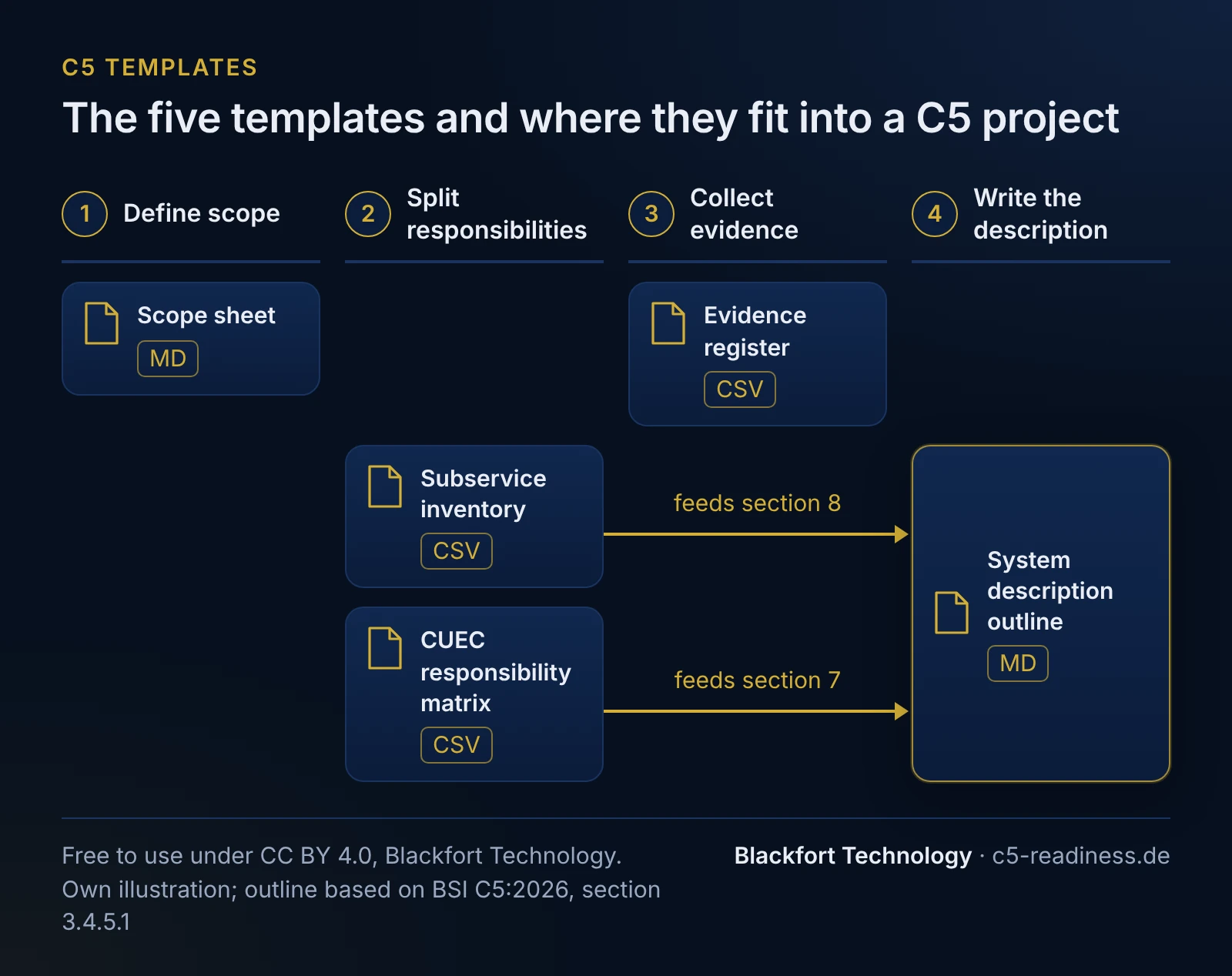
There are five templates, each covering one task in preparing for an attestation. The English files are separate versions with English headers. How to work out the content is explained on C5 scope and C5 system description; this page gives you the files with a short description.
| Template | Purpose | Format |
|---|---|---|
| Scope sheet | Record service, deadline, report type, regions, criteria and service organisations on a few pages | Word, Markdown |
| Evidence register | Track, per piece of evidence, which control it supports, where it is stored, who provides it and which period it covers | Excel, CSV |
| Responsibility matrix for complementary user entity controls (CUEC) | Define which controls the service relies on customers to perform and who owns them | Excel, CSV |
| Subservice inventory | List service organisations, choose carve-out or inclusive, track reports and monitoring | Excel, CSV |
| System description outline | Structure the system description according to the minimum content items | Word, Markdown |
Scope sheet
Six sections that capture what to settle before asking an auditor for a quote: service, regions, report type, deadline, catalogue revision, additional criteria and service organisations. Have management approve it, since they will later sign the management statement. How to define service, criteria and exclusions is explained on C5 scope.
The Word version has a cover page, document control with version history and approval, a table of contents and an introduction with references to the catalogue.
Download the scope sheet: Word (docx) · Markdown
Evidence register
One row per piece of evidence: criteria IDs, control, type of evidence, storage location, origin, owner, date or period covered, next update and status. The date or period column shows whether evidence covers a single date or, as Type 2 requires, the whole audit period. The population (for sampling) column records from which occurrences of a control the auditor can draw a sample.
The Excel version has a cover sheet with document control, an instructions sheet explaining each column, and drop-down lists and status colours in the table.
Download the evidence register: Excel (xlsx) · CSV
CUEC responsibility matrix
The matrix lists the complementary user entity controls (CUEC) your service relies on customers to perform, such as granting rights in their own tenant, with criteria ID, provider task, owners on both sides and where it is documented. It feeds minimum content item 7 of the system description (section 3.4.5.1 no. 7). A separate column records whether the catalogue gives complementary customer criteria for the criterion; these are general pointers and not the same as your service’s CUEC.
The Excel version has a cover sheet with document control, an instructions sheet explaining each column, and drop-down lists and status colours in the table.
Download the responsibility matrix: Excel (xlsx) · CSV
Subservice inventory
The inventory lists every service organisation with the details the catalogue requires for subservice organisations in the system description: company name, service, location of processing and storage, complexity and dependency, available C5 reports (sections 3.4.5.1 no. 8 and 3.4.6). It adds the method (carve-out or inclusive), the subcontractors of the service organisation, the controls you expect at the organisation (CSOC) and your monitoring. It also contains the information criterion SSO-04 lists for the directory of service organisations, such as head office address, applicable legal jurisdiction, contacts, risk classification and beginning of service usage. How to choose the method is explained on C5 scope.
The Excel version has a cover sheet with document control, an instructions sheet explaining each column, and drop-down lists and date checks in the table.
Download the subservice inventory: Excel (xlsx) · CSV
System description outline
The outline follows the eight minimum content items in section 3.4.5.1 with our own headings and bullet points, plus the Type 2 content and the information on planned changes under section 3.5. It does not replace the catalogue; its wording remains authoritative. What belongs in each section is explained on C5 system description.
The Word version has a cover page, document control, a table of contents, guidance per chapter and prepared tables, for example for applicable criteria and subservice organisations.
Download the outline: Word (docx) · Markdown
File formats
- The Word and Excel files open in Microsoft Office and LibreOffice. Each Excel file has a cover sheet, an instructions sheet, the table itself and a sheet with the licence and notes. Update the table of contents in the Word files with right-click > Update field.
- CSV files use a comma as separator and UTF-8 with BOM, so Excel and LibreOffice open them with special characters intact.
- Markdown files open in any text editor and work in Confluence, GitLab, Gitea or a wiki.
- Each table contains one example row with made-up values. Replace it with your own entries.
Licence and limits
The templates are licensed under CC BY 4.0. Attribution: “Template: Blackfort Technology, CC BY 4.0, https://c5-readiness.de/en/c5-templates”. When you share the template itself, unchanged or adapted, link to the licence and indicate your changes.
For completed documents you use as your own, such as a system description in an audit report, we as licensor additionally permit you to omit the attribution of the template and delete the licence notices relating to the template; to that extent we expressly waive the attribution required under section 3(a) of CC BY 4.0. This waiver does not apply to the parts taken from the BSI catalogue: if titles or quotations from the catalogue remain in the document, keep the notice “© Federal Office for Information Security 2026, Cloud Computing Compliance Criteria Catalogue (C5:2026), CC BY-ND 4.0”.
The templates contain criteria IDs as references and verbatim section and criteria titles from the BSI catalogue (© Federal Office for Information Security 2026, Cloud Computing Compliance Criteria Catalogue C5:2026, version 1.0.1). The titles are covered by the catalogue’s licence, CC BY-ND 4.0, which does not permit sharing adapted versions; share them only unchanged and with the copyright notice. The templates contain no criteria texts; individual short quotations from the catalogue are given in quotation marks. Everything else is our own work under CC BY 4.0.
The Blackfort logo and the name Blackfort Technology are excluded from the licence. You may share the unchanged template with the logo. Before you share an adapted or completed document, replace the logo and sender details on the cover and in the header and footer with your own. Do not use the logo or name in a way that suggests Blackfort Technology prepared or reviewed a completed document.
The templates are provided without warranty. A completed template is not evidence of an attestation; whether controls meet the criteria is for the auditor to judge.
Frequently asked questions
May I use the templates in my company or for clients?+
Do the templates contain the text of the C5 criteria?+
Is a system description based on this outline enough for the attestation?+
Do the templates work for C5:2020 and C5:2026?+
Read more
Sources
- BSI: Kriterienkatalog Cloud Computing C5:2026, version 1.1.0 (PDF, German), sections 3.4.3, 3.4.5.1, 3.4.6 and 3.5, licensed under CC BY-ND 4.0 (retrieved 2026-11-01)
- BSI: Cloud Computing Compliance Criteria Catalogue C5:2026, version 1.0.1 (PDF), licensed under CC BY-ND 4.0 (retrieved 2026-11-01)
- Creative Commons: Attribution 4.0 International (CC BY 4.0) (retrieved 2026-11-01)
- Creative Commons: Attribution-NoDerivatives 4.0 International (CC BY-ND 4.0) (retrieved 2026-11-01)
This content provides general technical and organisational information and does not constitute legal advice (no legal services within the meaning of the German RDG).